
AKS + corporate proxy
Many AKS teams hit the same problem. Security says all outbound traffic must go through a controlled egress point. This can be a corporate proxy, a next-generation firewall, or an inspection appliance. In many cases, that egress point lives in another subscription, another tenant, or is owned by another company.
The last case is less common, but real. If you run a SaaS product, some enterprise customers want traffic from your platform to pass through their proxy or firewall, not yours. They want visibility and control. They also usually do not want to peer their network with a vendor.
This post covers a design that handles these scenarios. It uses Azure Private Link Service (PLS) as a TCP tunnel for HTTP proxy traffic across tenant boundaries, without VNet peering.
Why Not Just Peer the VNets?
VNet peering is the obvious answer, but it has friction:
- Address space conflicts: enterprise environments grow organically, and two teams rarely coordinate their CIDR ranges in advance
- Blast radius: a peered VNet is a peered VNet; you are trusting the other team’s network security posture
- Cross-tenant peering requires Azure AD trust setup, not just network configuration
- Governance: many organizations restrict which teams can create peering relationships, especially across subscription boundaries
The result is that even when peering is technically possible, getting approval and coordinating the setup can take weeks.
The cross-tenant trust problem runs deeper than networking
If your workload cluster and the corporate proxy are in the same Azure AD tenant, cross-subscription peering is relatively straightforward. The peering initiator just needs the Network Contributor role on the remote VNet, which your team’s service principal can be granted.
But if the two sides are in different Azure AD tenants (common when a subsidiary or acquired company runs its own Azure environment), the situation changes significantly:
-
The accepting side must grant RBAC to a foreign principal. To allow your service principal (from tenant A) to initiate peering, the other team (in tenant B) must add your principal as a guest in their Azure AD and then assign it a role on their VNet. This is an Azure AD B2B invitation, a formal identity federation step that goes through security review.
-
The peering itself requires coordination on both sides simultaneously. Both sides must create the peering link within a short window. First one side creates it in a pending state, then the other side must accept. Automating this across tenants means your IaC pipeline needs credentials for both tenants at the same time.
-
Credential lifetime and rotation. The cross-tenant service principal needs ongoing access. That means managing secrets or federated credentials for a foreign tenant’s resources, which adds operational burden and creates a dependency that lives outside your normal access review cycle.
In practice, security teams often block this model. The request sounds simple: “add our service principal and give it network access.” But it crosses organizational boundaries, so compliance teams usually push back.
Private Link Service avoids this problem. No identity federation is needed. The corporate team approves an incoming PLS connection by alias, inside their own tenant. Your team creates a Private Endpoint in your own tenant. No cross-tenant credentials, no guest users, and no shared role assignments.
What Private Link Service Actually Is
Before getting to the trick, it helps to be precise about what PLS does at a low level.
Azure Private Link Service exposes an internal Load Balancer to consumers in other subscriptions or tenants. The consumer creates a Private Endpoint (PE) in their VNet. Azure carries traffic between PE and PLS on the Microsoft backbone by using NAT, so the two sides do not need to know each other’s IP ranges.
The key detail is this: PLS is a TCP forwarder. It does not inspect the protocol. It forwards TCP on a port. That port can carry SQL, gRPC, or HTTP proxy traffic.
That’s the insight.
The Design
There are two participants, which we can call the corporate side and the workload side.
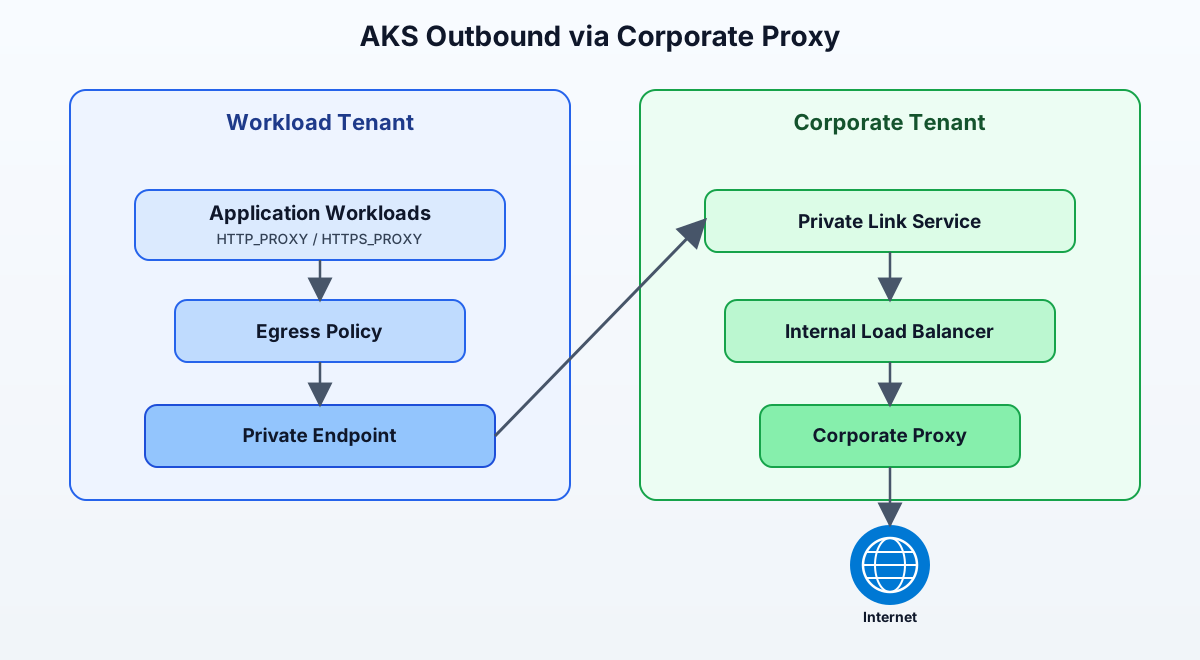 Figure: AKS Outbound via Corporate Proxy
Service documentation (diagram references):
The corporate side owns and controls the proxy. They decide who can route traffic through it, and all outbound connections appear from their public IP range. The workload side can deploy pods freely without coordinating network address space or requesting peering approvals.
Corporate Side: Exposing the Proxy
The corporate team deploys a proxy pod inside their AKS cluster. The interesting part is how they expose it. Instead of a regular ClusterIP or external LoadBalancer, they create an internal LoadBalancer Service with the AKS Private Link Service annotations:
apiVersion: v1
kind: Service
metadata:
  name: corporate-proxy
  annotations:
    service.beta.kubernetes.io/azure-load-balancer-internal: "true"
    service.beta.kubernetes.io/azure-pls-create: "true"
    service.beta.kubernetes.io/azure-pls-name: "corporate-proxy-pls"
    service.beta.kubernetes.io/azure-pls-ip-configuration-subnet: "pls-subnet"
    service.beta.kubernetes.io/azure-pls-ip-configuration-ip-address-count: "1"
    service.beta.kubernetes.io/azure-pls-visibility: "*"
    service.beta.kubernetes.io/azure-pls-auto-approval: "<workload-subscription-id>"
spec:
  type: LoadBalancer
  externalTrafficPolicy: Local
  selector:
    app: proxy
  ports:
    - port: 3128
      targetPort: 3128
When AKS processes this Service, the cloud controller manager creates an internal load balancer in the managed resource group and then attaches a Private Link Service to it. The result is a PLS resource with an alias, a globally unique string that looks like corporate-proxy-pls.abc12345.westeurope.azure.privatelinkservice.
The azure-pls-auto-approval annotation is how you pre-approve specific subscription IDs, so the workload team can connect without requiring manual approval each time.
The proxy pod itself is a standard deployment running any HTTP proxy. Tinyproxy works fine for the concept. Squid is better for production when you need ACLs, TLS inspection, or authentication.
apiVersion: apps/v1
kind: Deployment
metadata:
  name: proxy
spec:
  replicas: 2
  selector:
    matchLabels:
      app: proxy
  template:
    metadata:
      labels:
        app: proxy
    spec:
      containers:
        - name: proxy
          image: ubuntu/squid:latest
          ports:
            - containerPort: 3128
          volumeMounts:
            - name: squid-config
              mountPath: /etc/squid
      volumes:
        - name: squid-config
          configMap:
            name: squid-config
Once the Service is up and the PLS alias is known, the corporate team shares just that alias string with the workload team. Nothing else: no IP ranges, no routing tables, no firewall rules.
Workload Side: Creating the Private Endpoint
The workload team takes the PLS alias and provisions a Private Endpoint in their VNet. This is done with infrastructure-as-code, not through Kubernetes. In Bicep:
resource proxyEndpoint 'Microsoft.Network/privateEndpoints@2023-09-01' = {
  name: 'corporate-proxy-endpoint'
  location: location
  properties: {
    subnet: {
      id: endpointSubnetId
    }
    manualPrivateLinkServiceConnections: []
    privateLinkServiceConnections: [
      {
        name: 'proxy-connection'
        properties: {
          privateLinkServiceId: corporatePlsAlias
          requestMessage: 'workload-team-proxy-request'
        }
      }
    ]
  }
}

// Assign a predictable static IP to the endpoint NIC
resource proxyEndpointNic 'Microsoft.Network/networkInterfaces@2023-09-01' existing = {
  name: '${proxyEndpoint.name}.nic.0'
}
The critical design choice here is assigning a static, predictable IP to the Private Endpoint NIC. You want a known IP, something like 10.2.128.100, because every pod, deployment, and ConfigMap on the workload side will reference this address. If the IP is dynamic and changes, you have a configuration synchronization problem.
The way to do this cleanly is to pass the desired IP as a parameter to the endpoint module and set it during creation. Azure respects the requested static IP as long as it’s in the endpoint subnet’s range and not already in use.
Workload Side: Enforcing Proxy Use in the Cluster
Once the Private Endpoint is live and has its static IP, the Kubernetes work begins. There are two parts: configuring pods to use the proxy, and blocking them from bypassing it.
Pod proxy configuration
The simplest approach is environment variables. Any well-behaved application or HTTP client library respects HTTP_PROXY and HTTPS_PROXY:
apiVersion: apps/v1
kind: Deployment
metadata:
  name: workload-app
spec:
  template:
    metadata:
      labels:
        app: workload-app
        network: filtered
    spec:
      containers:
        - name: app
          image: myapp:1.0.0
          env:
            - name: HTTP_PROXY
              value: "http://10.2.128.100:3128"
            - name: HTTPS_PROXY
              value: "http://10.2.128.100:3128"
            - name: NO_PROXY
              value: "localhost,127.0.0.1,10.0.0.0/8,172.16.0.0/12,.cluster.local,kubernetes.default"
The NO_PROXY list matters. You do not want in-cluster traffic or node-to-API-server communication going through an external proxy.
For a production setup, you won’t want to scatter this configuration across every deployment manifest. A MutatingAdmissionWebhook that injects these environment variables based on a pod label is a cleaner solution. Pods opt in via the network: filtered label and the webhook handles the rest.
NetworkPolicy: the enforcement layer
Environment variables are cooperative. An application that doesn’t honor them will still reach the internet directly. To enforce the routing policy, you add a NetworkPolicy that blocks direct egress for any pod carrying the network: filtered label:
apiVersion: networking.k8s.io/v1
kind: NetworkPolicy
metadata:
  name: force-proxy-egress
  namespace: workloads
spec:
  podSelector:
    matchLabels:
      network: filtered
  policyTypes:
    - Egress
  egress:
    # Allow traffic to the proxy endpoint only
    - to:
        - ipBlock:
            cidr: 10.2.128.100/32
      ports:
        - protocol: TCP
          port: 3128
    # Allow DNS resolution
    - ports:
        - protocol: UDP
          port: 53
        - protocol: TCP
          port: 53
    # Allow in-cluster communication
    - to:
        - namespaceSelector: {}
With this policy in place, a filtered pod that tries to connect to anything on the internet without setting HTTP_PROXY will get its connection silently dropped. The NetworkPolicy says the only allowed egress path is to 10.2.128.100:3128.
For NetworkPolicy enforcement to work, the AKS cluster must use a network policy engine. Azure-native NetworkPolicy (using Azure CNI) or Calico both work here; Calico gives you more flexibility with GlobalNetworkPolicy for cluster-wide defaults.
Traffic Flow
When a filtered pod makes an HTTPS request to an external service, the path looks like this:
- Traffic exits the AKS pod and goes to the proxy endpoint IP (
10.2.128.100:3128). - The Private Endpoint forwards the TCP session over Azure Private Link to the corporate-side Private Link Service.
- Azure applies SNAT at the PLS boundary, then sends traffic to the corporate proxy pod.
- The proxy pod opens the outbound connection to the target internet service.
- The response returns on the same path back to the AKS pod.
Note: This pattern affects outbound (egress) traffic only. It does not affect your inbound (ingress) traffic path.
One important behaviour to note: the SNAT at the PLS layer. Azure applies source NAT when traffic enters the Private Link Service from the consumer side. The proxy pod sees the connection originating from one of the PLS NAT IP addresses in the corporate VNet, not from the workload pod’s IP. This means the proxy’s access logs will show corporate VNet addresses, not workload pod IPs.
If you need the original client identity in the proxy logs (for audit purposes), you can enable TCP Proxy Protocol on the PLS and parse the PROXY header in Squid or nginx. The annotation azure-pls-proxy-protocol: "true" enables this on the Azure side. The proxy pod must then be configured to read and trust the Proxy Protocol header.
Design Decisions Worth Considering
Scalability of the PLS NAT pool. Each PLS NAT IP can handle a limited number of concurrent TCP connections. Azure provisions a small number of NAT IPs by default (configurable up to 8). In a busy cluster with many concurrent egress connections, you could exhaust SNAT ports. Monitor the ByteCount and ConnectionCount metrics on the PLS and provision additional NAT IPs if you see connection failures. The annotation azure-pls-ip-configuration-ip-address-count on the service controls this.
Single point of failure. The proxy pod on the corporate side is in the critical path for all outbound workload traffic. Run multiple replicas and configure anti-affinity rules. The ILB in front of the proxy handles distribution across replicas automatically.
Proxy authentication. If the corporate proxy requires authentication (common in enterprise Squid setups), the HTTP_PROXY env var supports credentials: http://user:password@10.2.128.100:3128. In a production setting, pull those credentials from a Kubernetes Secret and use secretKeyRef. Do not hardcode them in the deployment spec.
TLS inspection. If the corporate proxy performs TLS inspection, pods making HTTPS requests will see the proxy’s certificate, not the original server’s. You need to add the corporate CA to the container’s trusted certificate store, or applications will fail with TLS errors. The cleanest way is to bake the CA cert into your base image or use an init container to add it to the system trust store.
Cross-tenant approval flow. The azure-pls-auto-approval annotation pre-approves specific subscription IDs within the same tenant. When the workload runs in a different Azure AD tenant, auto-approval does not work. The consumer submits a connection request and the corporate team approves it manually:
# Corporate team: list private endpoint connections on the PLS
az network private-endpoint-connection list \
  --resource-group corporate-rg \
  --name corporate-proxy-pls \
  --type Microsoft.Network/privateLinkServices

# Approve a specific connection by name
az network private-endpoint-connection approve \
  --resource-group corporate-rg \
  --name <connection-name> \
  --type Microsoft.Network/privateLinkServices \
  --resource-name corporate-proxy-pls \
  --description "Approved for workload tenant"
This is a one-time step per consumer, and it stays inside the corporate tenant. No identity federation, no guest accounts, no RBAC grants in either direction. This is one reason the model is often easier to pass in enterprise security reviews than cross-tenant VNet peering.
When This Design Makes Sense
This approach is a good fit when:
- The workload team and the corporate networking team are in different organizational units with separate Azure tenants or subscriptions
- VNet address space conflicts make peering impractical
- The corporate team wants to remain in full control of outbound internet routing without owning the workload AKS infrastructure
- You want a simple connectivity primitive: one alias string shared out-of-band, no firewall rules, no route tables
It is less suitable when the workload itself needs direct non-HTTP/HTTPS connectivity (e.g., raw TCP to a database), or when you need extremely high throughput. PLS adds latency and has SNAT port limits that make it unsuitable as a general-purpose network bridge.
Summary
Azure Private Link Service is usually used to share databases, APIs, or storage privately across subscriptions. But because it operates at the TCP level, it doesn’t care what protocol runs through it.
If you expose a corporate proxy as PLS and connect with a Private Endpoint, you get cross-tenant proxy routing without VNet peering and without shared address space. The workload team only gets one path: send traffic to this IP on port 3128.
The Kubernetes side, HTTP_PROXY environment variables plus a NetworkPolicy that blocks direct egress, turns a cooperative pattern into an enforced one. Pods that don’t go through the proxy can’t go anywhere at all.
It is an unconventional design, but it works well and solves a real multi-tenant enterprise problem.